
CalcBuilder Tutorial
Example: a loan calculator with an amortization schedule (PHP code)
▶ A two-minute video walkthrough of this example (English audio & subtitles). The written steps below cover the same ground.
A fuller example that shows off the PHP engine: a loan / mortgage calculator that returns the monthly payment, the total interest, the total repaid and a year-by-year amortization table — all built with PHP code from variables the code produces.
This is the PHP code version. The exact same calculator built with an uploaded Excel workbook instead of PHP is in the next tutorial — compare them to decide which approach suits you.
1. Create the calculator and fields
Add → Name Loan Calculator. On Form Fields add three Number fields:
loan_amount— “Loan amount (€)”, default 20000annual_rate— “Annual interest rate (%)”, 2 decimals, default 6.5years— “Term (years)”, default 5
2. PHP code
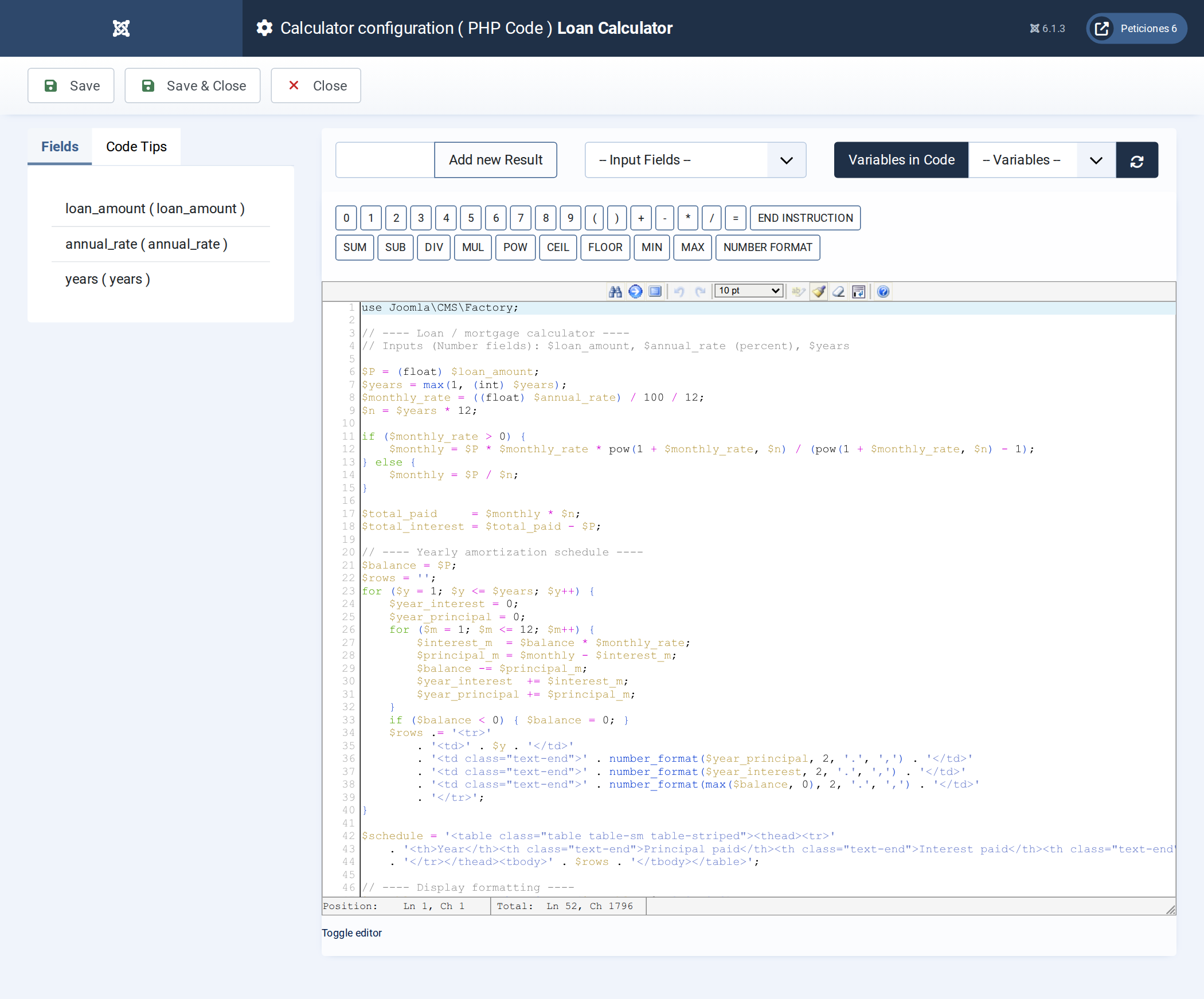
$P = (float) $loan_amount;
$years = max(1, (int) $years);
$monthly_rate = ((float) $annual_rate) / 100 / 12;
$n = $years * 12;

if ($monthly_rate > 0) {
    $monthly = $P * $monthly_rate * pow(1 + $monthly_rate, $n) / (pow(1 + $monthly_rate, $n) - 1);
} else {
    $monthly = $P / $n;
}

$total_paid     = $monthly * $n;
$total_interest = $total_paid - $P;

// year-by-year schedule -> build an HTML table in $schedule
$balance = $P; $rows = '';
for ($y = 1; $y <= $years; $y++) {
    $yi = 0; $yp = 0;
    for ($m = 1; $m <= 12; $m++) {
        $i = $balance * $monthly_rate;
        $pr = $monthly - $i;
        $balance -= $pr; $yi += $i; $yp += $pr;
    }
    if ($balance < 0) $balance = 0;
    $rows .= '<tr><td>'.$y.'</td><td class="text-end">'.number_format($yp,2).'</td>'
           . '<td class="text-end">'.number_format($yi,2).'</td>'
           . '<td class="text-end">'.number_format(max($balance,0),2).'</td></tr>';
}
$schedule = '<table class="table table-sm table-striped"><thead><tr>'
          . '<th>Year</th><th class="text-end">Principal</th><th class="text-end">Interest</th><th class="text-end">Balance</th>'
          . '</tr></thead><tbody>'.$rows.'</tbody></table>';

$monthly        = number_format($monthly, 2);
$total_paid     = number_format($total_paid, 2);
$total_interest = number_format($total_interest, 2);
3. Exit Layout
Three summary cards, a sentence restating the inputs, then the whole schedule with one placeholder:
<div class="row g-3 mb-4">
  <div class="col-md-4"><div class="p-3 text-center" style="background:#eef2ff;border-radius:8px">
    <div class="text-muted small">Monthly payment</div><div style="font-size:1.6rem;font-weight:700">##monthly## €</div></div></div>
  <div class="col-md-4"><div class="p-3 text-center" style="background:#f0fdf4;border-radius:8px">
    <div class="text-muted small">Total interest</div><div style="font-size:1.6rem;font-weight:700">##total_interest## €</div></div></div>
  <div class="col-md-4"><div class="p-3 text-center" style="background:#fef2f2;border-radius:8px">
    <div class="text-muted small">Total repaid</div><div style="font-size:1.6rem;font-weight:700">##total_paid## €</div></div></div>
</div>
<p class="text-muted">Borrowing <strong>##loan_amount## €</strong> at <strong>##annual_rate##%</strong> over <strong>##years## years</strong>.</p>
<h5>Yearly amortization schedule</h5>
##schedule##
4. Preferences & publish
Button text “Calculate loan”, calculate on load on. Menu item of type Calc Builder with this calculator selected. Turn on the PDF button on the Preferences tab and add a branded header on Print Preferences so visitors can download the schedule.
Result
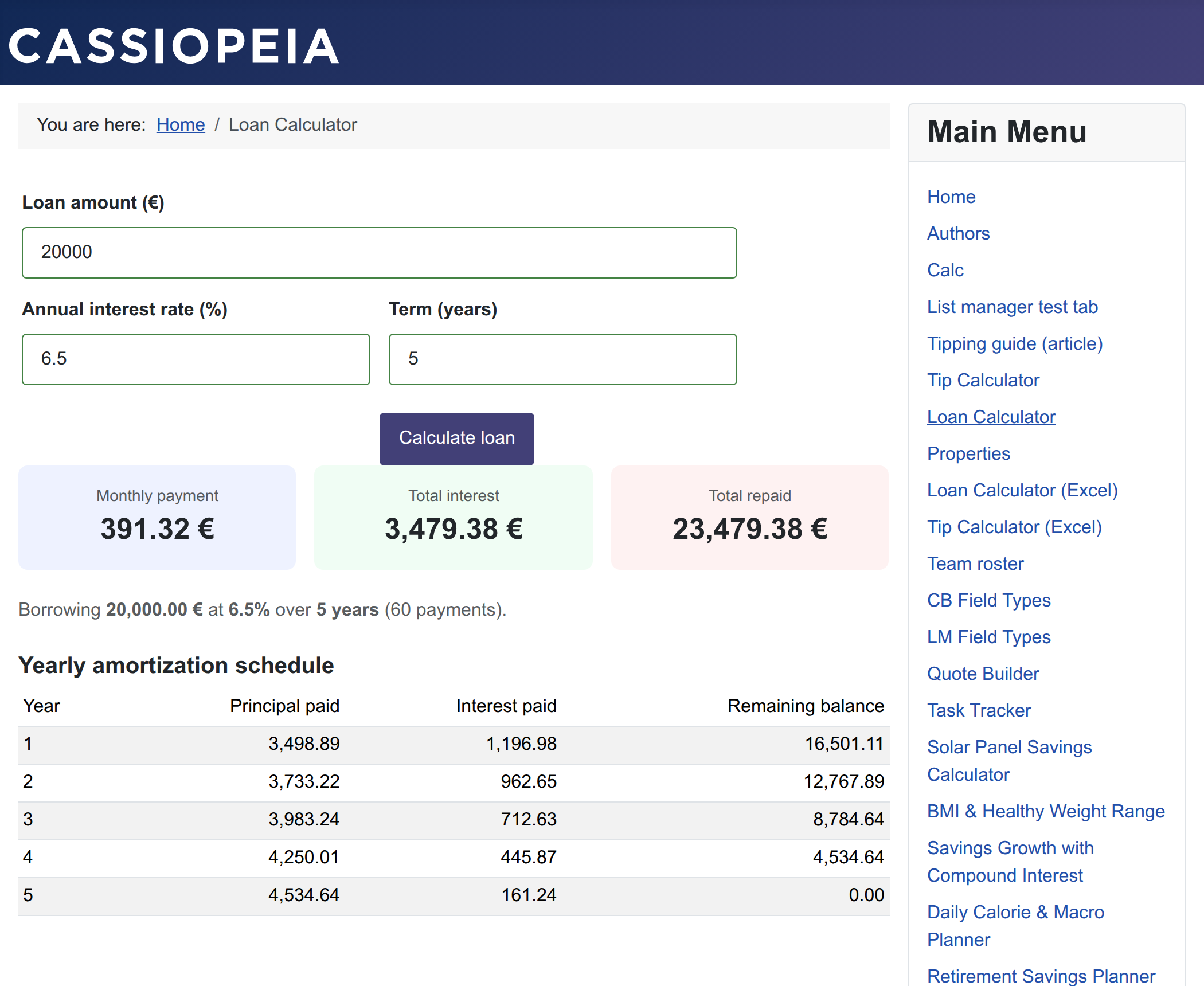
The same pattern — compute values, build an HTML fragment in a variable, print it with one placeholder — scales to quotes, invoices, scoring reports and comparison tables. For even more complex inputs (“add another loan”) combine it with a section.
Prefer to keep the maths in a spreadsheet? The
Excel version of this same calculator produces
an identical result with no finance code — an uploaded .xlsx does the work.